


M12 Image Sharpness Problems: Diagnosing Tilt, Decentering, and Focus
A controlled diagnostic method for separating M12 lens tilt, sensor alignment, decentering, field curvature and focus-setting errors before changing suppliers or specifications.
Key Takeaways
Image Sharpness Problems should be traced by stabilizing the test, mapping focus across the field and changing one optical or mechanical variable at a time.
- A sharp center does not demonstrate acceptable performance at the field positions used by the application.
- If asymmetry follows a lens across known-good cameras, investigate lens-specific variation before changing the camera.
- If multiple lenses produce the same fixed pattern on one camera, inspect the sensor, holder and camera stack-up.
- Focus sweeps separate a poor focus choice from field curvature, but acceptance must remain tied to the inspection task.
- Recheck focus after locking or adhesive cure before approving a production assembly.
The Short Answer
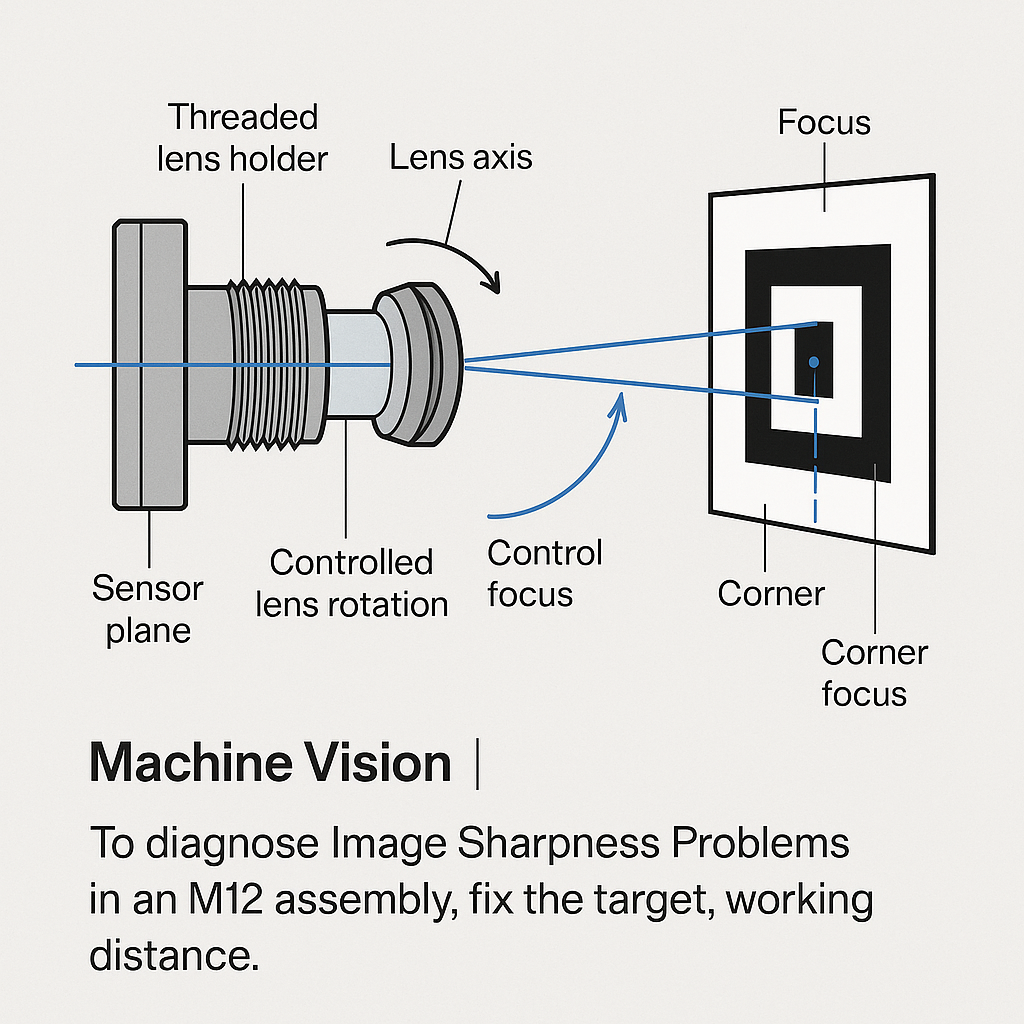
To diagnose Image Sharpness Problems in an M12 assembly, fix the target, working distance, lighting, aperture and camera orientation. Record center and corner sharpness, sweep focus, and then rotate or exchange one component at a time. A pattern that follows the lens supports a lens-specific cause; a pattern that remains with the camera supports investigation of the sensor, holder or stack-up. These outcomes are diagnostic evidence, not proof by themselves. Inspect thread seating and clearance, then judge center-focused and balanced-field results against the actual inspection region.
Asymmetric blur is a system symptom. Lens design and manufacturing, field position, aperture, sensor characteristics, processing, focus error and camera motion can all affect measured sharpness, according to Imatest’s sharpness measurement guidance. Replacing a lens before controlling those variables can move the symptom without identifying its cause.
What Asymmetric Image Sharpness Reveals in an M12 Camera Assembly
Recognizing corner-specific, side-to-side and diagonal loss
Start with the geometry of the defect. One soft corner opposite a sharp corner suggests that best focus may not be parallel to the sensor. A uniformly soft perimeter with a strong center points toward a different focus surface or off-axis lens limitation. A left-right difference that survives refocusing deserves an alignment investigation.
None of these patterns establishes root cause alone. Sensor tilt, M12 lens tilt, holder geometry, decentered elements and target misalignment can produce overlapping symptoms. Image processing can also exaggerate or conceal regional differences.
Why center sharpness is insufficient
Center-only focusing can favor the easiest image region while hiding weak edge performance. Record the center, four corners and any field positions where the machine actually makes a decision. For quantitative work, use the same slanted-edge or other defined target feature at every location; MTF expresses retained contrast by spatial frequency rather than reducing performance to a subjective sharp/soft label.
Reviewing M12 lens MTF reports can help procurement teams distinguish nominal design data from measured lens or assembled-camera results. Comparisons remain valid only when field position, spatial frequency and test conditions match.
Application-relevant performance
A barcode reader may tolerate soft unused corners. A metrology system using the full sensor may not. Define an acceptance threshold around the task: feature visibility, edge-location error, contrast at a relevant spatial frequency or inspection pass criteria. A visually attractive center image isn’t a substitute for that requirement.
Establish a Controlled Baseline Before Changing Components
Target, distance, illumination and orientation
Use a flat target held square to a rigidly mounted camera. Keep working distance, target scale, illumination, exposure, gain, sharpening and camera orientation unchanged. Uniform illumination reduces contrast gradients that can mask focus differences, while rigid mounting prevents camera movement from being mistaken for a focus change.
The production working distance is the primary test condition. Where object distance varies, evaluate the required minimum, nominal and maximum distances using one locked focus setting. SUPERIOR’s guide to M12 working distance and aperture explains why a favorable nominal image does not represent depth variation automatically.
Aperture, wavelength and focus condition
Test at the intended aperture and with the production optical filter. Changing aperture changes the balance among light, focus tolerance and diffraction. Switching from visible light to near-infrared can move the preferred focus because the lens, filter and spectrum have changed. Selection guidance for an M12 NIR lens should therefore be applied to the complete operating band, not a visible-light setup alone.
Record before adjusting
Save an unprocessed or consistently processed frame, lens identity, camera identity, holder identity, working distance, wavelength, aperture condition and focus position. Mark the physical top of the lens and camera. Those orientation marks make subsequent rotation evidence interpretable.
Diagnostic Sequence for M12 Image Sharpness Problems
To diagnose the assembly efficiently, stabilize the test and change one variable at a time:
- Verify the setup. Check target flatness, camera rigidity, illumination and repeatability by returning to the same focus position.
- Map the field. Record the center, edges and four corners at the current setting rather than choosing one favorable crop.
- Run a focus sweep. Move through focus in repeatable increments and identify the best center, edge and corner positions.
- Rotate a controlled component. Rotate the lens or complete camera while retaining orientation marks. Note whether the soft area rotates, remains fixed on the sensor, or remains fixed relative to the target.
- Exchange the lens. Install a known-good comparison lens while holding the camera, holder, target and procedure constant.
- Exchange the camera assembly. Test the suspect lens on a known-good camera and holder under equivalent conditions.
- Inspect the interface. Check thread engagement, seating, locking force, barrel clearance and clearance to the sensor stack before assigning optical fault.
M12 focus is adjusted by changing lens-to-sensor spacing through the threaded mount. With an M12×0.5 thread, one full turn represents 0.5 mm of nominal axial travel; a 1/16-turn adjustment represents 31.25 µm. Those figures describe thread movement, not guaranteed image-plane focus shift. The Imaging Source’s M12 focusing guidance also recommends rigid mounting, off-center charts and verification after locking.
Diagnosing Sensor Tilt and M12 Lens Tilt
Indicators supporting sensor investigation
If the same image-region imbalance remains fixed on one camera while multiple known-good lenses are installed, the evidence supports investigating sensor package alignment, board or holder mounting, and the camera’s mechanical stack-up. It does not prove bare-sensor tilt: a holder fixed to that camera can create the same persistence.
Indicators supporting lens tilt or non-square seating
A lens may sit at an angle when thread fit, seating surfaces, locking force or interference prevents square engagement. Sharpness that changes after removal and reinstallation is particularly relevant. Inspect M12 lens holder tolerances before rejecting an optical design; inconsistent seating can turn a mechanical interface problem into an apparent lens defect.
Interpreting rotation tests
Engineering inference: if a marked blur pattern rotates with the lens while the camera and target remain controlled, the lens or its seating becomes the leading suspect. If it stays at the same sensor coordinates through lens rotation and replacement, the camera-side assembly becomes more likely. Rotation is evidence for prioritizing the next test, not a conclusive diagnosis.
How to Diagnose Lens Decentering and Lens Alignment Issues
Patterns and controlled comparisons
Lens decentering means one or more optical elements are displaced from the intended optical axis. Unequal off-axis sharpness can be consistent with decentering, but similar asymmetry can come from tilt, astigmatism, field curvature or holder fit. Avoid assigning decentering from one image.
A replacement-lens comparison is stronger when the suspect lens carries the same asymmetric pattern across two known-good cameras, while comparison lenses do not. Record serial or lot identifiers where available and preserve unchanged files for supplier review.
Holder-induced misalignment
If the result changes with installation torque, lock-ring position or seating depth, investigate the interface first. Look for incomplete thread engagement, debris, barrel contact, a bottomed lens, adhesive intrusion or lateral play. Supplier escalation should state whether the pattern followed the lens, the camera or the installation event.
Field Curvature Testing and Focus Position Evaluation
Center-focused versus balanced-field focus
Capture a through-focus series without moving the target. Score the same center, edge and corner regions in every frame. A center-focused setting maximizes the center criterion. A balanced-field setting deliberately gives up some center margin to improve required off-axis locations.
Illustrative decision: suppose setting A passes the center but fails two inspection corners, while setting B passes all five required regions with lower center margin. Setting B is the defensible production choice. This example is a decision rule, not measured SUPERIOR product data.
When field curvature is acceptable
Field curvature is acceptable only if the required object locations remain within the system’s permitted focus range. For a task using a curved or shallow central region, edge softness may be irrelevant. For planar inspection across the sensor, a large center-to-corner focus separation may require a different optical design, aperture strategy or sensor format.
Do not rank two lenses by each one’s best region. Compare them at the same working distance, aperture, spectrum, processing and task-specific field positions.
Observation-to-Cause Matrix for M12 Sharpness Troubleshooting
| Observation | Possible cause | Controlled confirming test | Interpretation / next action |
|---|---|---|---|
| One corner is softer than the opposite corner | Sensor or lens tilt, seating error, decentering | Rotate marked components separately | Follow the pattern to the lens, camera or target setup |
| Center is sharp; corners improve elsewhere in focus | Field curvature or center-biased focus | Capture an incremental focus sweep | Select a task-based balanced setting or reconsider the design |
| Sharpness changes after locking or reinstallation | Thread fit, locking shift, interference | Repeat installation with controlled seating | Correct the interface before rejecting the lens |
| Pattern follows one lens across cameras | Lens-specific variation or seating interaction | Test on a second known-good assembly | Document and submit the lens-specific evidence |
| Pattern remains on one camera with several lenses | Sensor, holder or camera alignment | Install known-good lenses under fixed conditions | Investigate the camera-side stack-up |
| Visible and NIR focus differ | Spectral focus shift, filter or illumination change | Test each intended band with production filters | Specify focus against the operating spectrum |
The matrix narrows the next action; it doesn’t convert correlation into proof. Retain original images, focus-step labels and configuration records so engineering and suppliers can reproduce the comparison.
Corrective Actions After the Root Cause Is Confirmed
Mechanical corrections
For holder or seating faults, correct the datum surfaces, thread fit, engagement depth, barrel clearance and locking method. Recheck focus after the lock ring or adhesive is applied. Practical M12 guidance from Commonlands Optics specifically recommends field comparison, through-focus checks and post-lock verification.
Avoid compensating for a tilted interface by choosing a focus setting that merely hides the worst region. That can reduce production margin and make results sensitive to reinstallation.
Revising the optical specification
When repeatable tests confirm an optical limitation, specify sensor format, pixel size, working distance range, aperture, wavelength, required field positions and measurable acceptance criteria. Sensor coverage should also be checked before assuming that focal length alone defines compatibility; the guide to M12 sensor coverage and field of view outlines the relevant geometry.
A different stock lens may resolve the issue when its designed image field and operating conditions match the task. A Machine Vision Lens or custom optical assembly review is more appropriate when controlled tests show that holder fit and camera alignment are not the limiting factors.
For an engineering review of persistent Image Sharpness Problems, provide sensor format, pixel size, working distance, wavelength, aperture condition, holder details, component orientation and labeled center-to-corner images. That package supports a technical decision instead of an open-ended lens swap.
Frequently Asked Questions
Can an M12 lens appear sharp during setup but lose sharpness after final locking or adhesive cure?
Yes. Tightening a lock ring or applying adhesive can alter lens position or seating, and cure-related movement may change the final focus. Capture the required field positions after the production locking process, not only during adjustment. If the shift repeats, investigate locking force, adhesive placement, thread fit and cure procedure.
Should an OEM evaluate sharpness at the final working distance or at multiple production distances?
Evaluate the nominal working distance and every required production extreme. When the object distance varies, lock one production focus setting and capture the minimum, nominal and maximum distances without refocusing. Testing each distance at its own best focus measures lens capability, but it does not verify depth performance in the assembled product.
How can different pixel sizes change the visibility of an otherwise minor sharpness imbalance?
Smaller pixels sample the image more densely, so a regional optical difference may become easier to observe, provided signal, processing and target detail support that comparison. Pixel size alone does not determine system resolution. Compare assembled-camera performance using the intended sensor, field positions, aperture, spectrum and processing settings.
When is a balanced-field focus setting more appropriate than maximum center sharpness?
A balanced-field setting is preferable when the application depends on off-axis regions and maximum center focus causes one or more required locations to fail. The correct setting is the one that maintains acceptable performance across all decision regions. It may be unsuitable when only a small central region matters.
What information should be included when sending an asymmetric sharpness issue to a lens supplier?
Include the lens and camera identifiers, sensor format, pixel size, holder, working distance, aperture condition, wavelength, filter, target, lighting and processing settings. Add labeled center, edge and corner files from the focus sweep, component orientation marks, rotation results, replacement-lens comparisons, locking method and the acceptance criterion that failed.
Topics
Related Articles
M12 Camera MTF Testing: Chart Quality, RAW Images, and Repeatability
10 min read
M12 Catalog vs Custom Lenses: Justifying Development for OEM Cameras
11 min read
M12 Lens MTF Reports: Comparing Nominal, Toleranced, and Measured Data
10 min readAbout SUPERIOR OPTICS
SUPERIOR OPTICS specializes in CCTV lenses, machine vision optics, and custom optical solutions for security, industrial imaging, and specialty applications. We also provide professional lens selection and application support.